










In this article, we’ll compare Trello vs Asana vs Truedoit to help you decide which tool fits your workflow best
Manage Your Freelance Work Smarter
Stay organized with tasks, reminders, invoices, notes, files and daily workflow using Truedoit.
Try Truedoit Free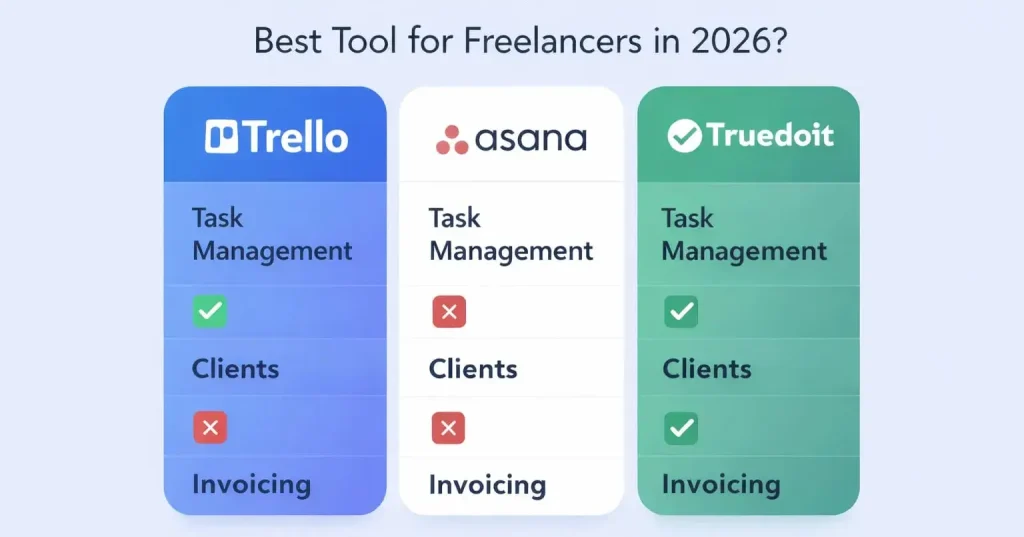
Trello – Simple & Visual Task Management
Trello is known for its Kanban-style boards, making it very easy to manage tasks visually.
✅ Pros:
– Simple drag-and-drop interface
– Great for beginners
– Visual task tracking
❌ Cons:
– No built-in client management
– No invoicing features
– Limited scalability for complex workflows
👉 Best for: Individuals or small teams who want a simple task board
Asana – Powerful Project Management Tool
Asana is designed for teams handling complex workflows and multiple projects.
✅ Pros:
– Advanced task tracking
– Timeline and workflow automation
– Great for team collaboration
❌ Cons:
– Slight learning curve
– Can feel complex for freelancers
– No built-in invoicing or client tracking
👉 Best for: Teams managing large projects and structured workflows
Trello alternative – Truedoit All-in-One Freelancer & Business Tool
Truedoit – All-in-One Freelancer & Business Tool
Truedoit is built specifically for freelancers and small businesses who want everything in one place.
✅ Pros:
– Task + Client + Invoice management in one platform
– Simple and clean dashboard
– Designed for freelancers and solo founders
– Saves time by reducing multiple tools
❌ Cons:
– Newer platform (growing features)
👉 Best for: Freelancers and small teams who want an all-in-one solution
Trello & Asana focus mainly on task/project management
🚀 Built for Productive Freelancers
Join the Truedoit newsletter for productivity tips, freelancer guides, feature updates & exclusive offers.
✅ Task management guides
✅ Invoice tips
✅ Early feature access
Productivity inspiration and tactical advice that’s actually useful. Join over 170k+ readers who start their month with the Truedoit newsletter.