










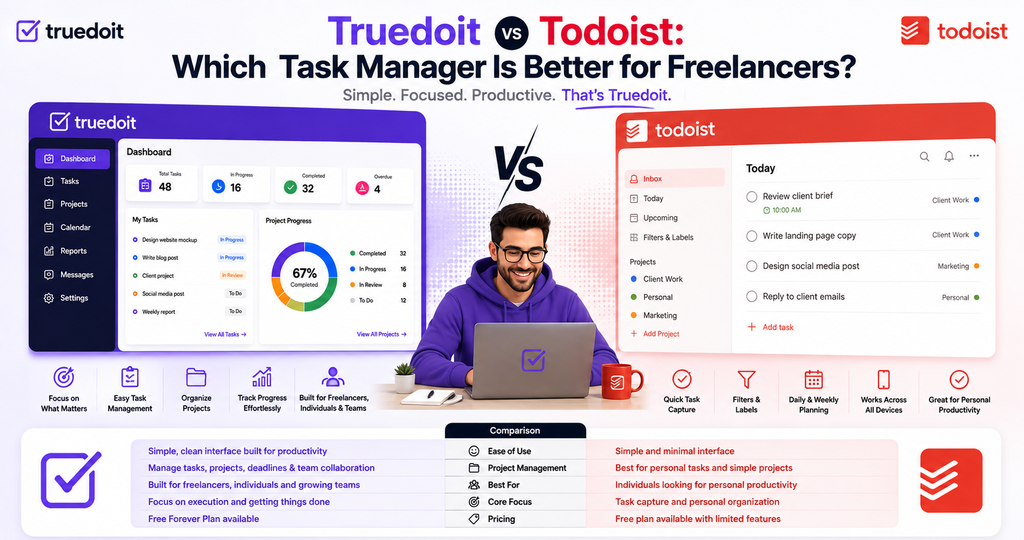
Truedoit vs Todoist : If you’re looking for a simple way to organize your work, both Truedoit and Todoist can help you manage tasks and deadlines.
Manage Your Freelance Work Smarter
Stay organized with tasks, reminders, invoices, notes, files and daily workflow using Truedoit.
Try Truedoit FreeThe difference is what they are built around. Truedoit vs Todoist
Todoist is a powerful general-purpose task manager for organizing work and life. Truedoit is designed specifically for freelancers who want to manage tasks alongside clients, projects, and invoices.
If you only need a to-do list, Todoist is an excellent choice. If your tasks are connected to freelance clients and paid projects, Truedoit gives you a more freelancer-focused workflow.
Quick Comparison Truedoit vs Todoist
| Feature | Truedoit | Todoist |
|---|---|---|
| Task management | ✓ | ✓ |
| Due dates | ✓ | ✓ |
| Task priorities | ✓ | ✓ |
| Recurring tasks | ✓ | ✓ |
| Task reminders | ✓ | ✓ |
| Calendar planning | ✓ Premium | ✓ Pro |
| Client management | ✓ | — |
| Client-specific work | ✓ | Limited |
| Project management | ✓ | ✓ |
| Invoicing | ✓ | — |
| Freelancer-focused | ✓ | — |
| General personal productivity | ✓ | ✓ |
| Natural-language task entry | — | ✓ |
| Advanced filters | — | ✓ |
| Large integration ecosystem | — | ✓ |
| Team collaboration | Limited | ✓ |
| AI task assistance | — | ✓ |
| Simple freelancer dashboard | ✓ | — |
Feature availability can vary by plan and product updates. Check each product’s current plan details before choosing.
The Biggest Difference Truedoit vs Todoist
The easiest way to understand the difference is this:
Todoist helps you manage your tasks.
Truedoit helps you manage your freelance work.
With Todoist, you might create:
Design homepage
Send client email
Finish landing page
Submit final files
With Truedoit, those tasks can exist within the context of your freelance workflow:
Client: Acme Studio
Project: Website Redesign
Tasks: Design homepage → Review changes → Deliver files
Invoice: Connected to the client/project workflow
That distinction matters when your work is organized around multiple clients.
Truedoit: Built for Freelancers
Truedoit is designed around the everyday workflow of freelancers, creators, consultants, designers, developers, editors, and other independent professionals.
Instead of combining several separate tools, Truedoit brings together:
- Tasks
- Clients
- Projects
- Invoices
- Calendar planning
- Reports
The goal is simple: keep your freelance work organized without unnecessary complexity.
Truedoit’s current free plan includes unlimited tasks, up to three clients, reports, reminders, and basic invoices. Its Premium plan adds unlimited clients, calendar view, customizable invoices, tax options, and custom reminders.
Why Choose Truedoit?
1. Your tasks are connected to your clients
A freelancer rarely works on completely independent tasks.
A task usually belongs to a client.
you can organize work around the client and project it belongs to.
This makes it easier to understand what needs to be done and who it’s for.
2. Tasks and invoices live together
This is one of the biggest differences between Truedoit and a traditional to-do list.
Todoist is primarily focused on organizing tasks and projects. Its current feature set includes reminders, priorities, subtasks, filters, calendar views, reporting, integrations, and AI assistance.
Truedoit adds a freelancer-specific business layer by putting clients and invoicing alongside task management.
3. Less setup
Todoist gives you a flexible productivity system that can work for many different types of users.
Truedoit starts with a more specific assumption:
You’re a freelancer managing client work.
That means you don’t have to build your own freelance workflow from generic productivity features.
4. Designed around independent work
Truedoit isn’t trying to be an enterprise project-management platform.
It’s designed for people who work independently and need a simple way to manage their workload and clients.
Todoist: Excellent for Pure Task Management
Todoist is one of the strongest choices if your main requirement is simply:
“I want a really good task manager.”
Its current feature set includes:
- Tasks and subtasks
- Due dates and times
- Priorities
- Reminders
- Recurring due dates
- Labels
- Filters
- List and board views
- Calendar planning
- Task duration
- Productivity reporting
- AI assistance
- 90+ integrations
Its free plan currently includes up to five personal projects, while Pro expands that to 300 personal projects and adds features such as calendar layout, task duration, custom reminders, full reporting history, deadlines, and Task Assist.
Truedoit vs Todoist: Which One Should You Choose?
The answer depends on how you work.
Choose Truedoit if:
- You’re a freelancer or solopreneur
- Your work is organized around clients
- You want tasks and client information together
- You want invoicing alongside your work
- You prefer a simple, focused interface
- You don’t want to configure a general-purpose productivity system
- You want one place for your freelance tasks, clients, projects, and invoices
Choose Todoist if:
- You mainly want a powerful to-do list
- You manage both personal and professional tasks
- You need advanced filters and productivity views
- You want natural-language task entry
- You need a large integration ecosystem
- You want a mature general-purpose productivity platform
Truedoit vs Todoist What About Price?
Truedoit currently offers a free forever plan with unlimited tasks and up to three clients. Its Premium plan is listed at $3.99/month, with unlimited clients and additional features such as calendar view and customizable invoices.
Todoist currently offers a free Beginner plan. Its Pro plan is listed at $5 per user/month when billed annually, while Business is $8 per user/month when billed annually, plus applicable local tax.
Pricing can change, so check the current pricing pages before subscribing.
The Bottom Line
There isn’t one universal winner.
Todoist is the better choice if you want a powerful general-purpose task manager.
Truedoit is the better choice if you’re a freelancer and small business want your task management connected to your clients and freelance business.
Think of it this way:
Todoist: Manage your tasks.
Truedoit: Manage your freelance and business work.
If your work starts with clients and projects, rather than just a personal to-do list, Truedoit is designed to keep those pieces together in one place.
Ready to Try Truedoit?
Start organizing your freelance work with tasks, clients, projects, and invoices in one simple dashboard. Signup
Frequently Asked Questions
Is Truedoit better than Todoist?
It depends on what you need. Todoist is stronger as a general-purpose task manager, while Truedoit is specifically designed around freelance and small business work, including tasks, clients, projects, and invoices.
Is Truedoit a task management tool?
Yes. Task management is one of Truedoit’s core features. The platform also connects tasks with clients, projects, invoices, calendar planning, and reports.
Can I use Truedoit for free?
Yes. Truedoit currently advertises a free plan with unlimited tasks and up to three clients.
Which is better for a solo freelancer: Truedoit or Todoist?
If you only need task management, either can work well. If you want your tasks connected to clients and invoicing, Truedoit is the more freelancer-specific option.
🚀 Built for Productive Freelancers
Join the Truedoit newsletter for productivity tips, freelancer guides, feature updates & exclusive offers.
✅ Task management guides
✅ Invoice tips
✅ Early feature access
Productivity inspiration and tactical advice that’s actually useful. Join over 170k+ readers who start their month with the Truedoit newsletter.