









- An RFP template helps businesses and freelancers create professional project requests quickly and clearly.
- RFP documents usually include project goals, scope of work, timelines, budgets, and proposal requirements.
- Using RFP templates improves communication, saves time, and helps businesses compare proposals more efficiently.
- Platforms like Truedoit, PandaDoc, Bonsai, DocuSign, and Notion help manage proposals, projects, and workflows.
- Well-structured RFP templates reduce misunderstandings and improve project planning for freelancers and businesses.
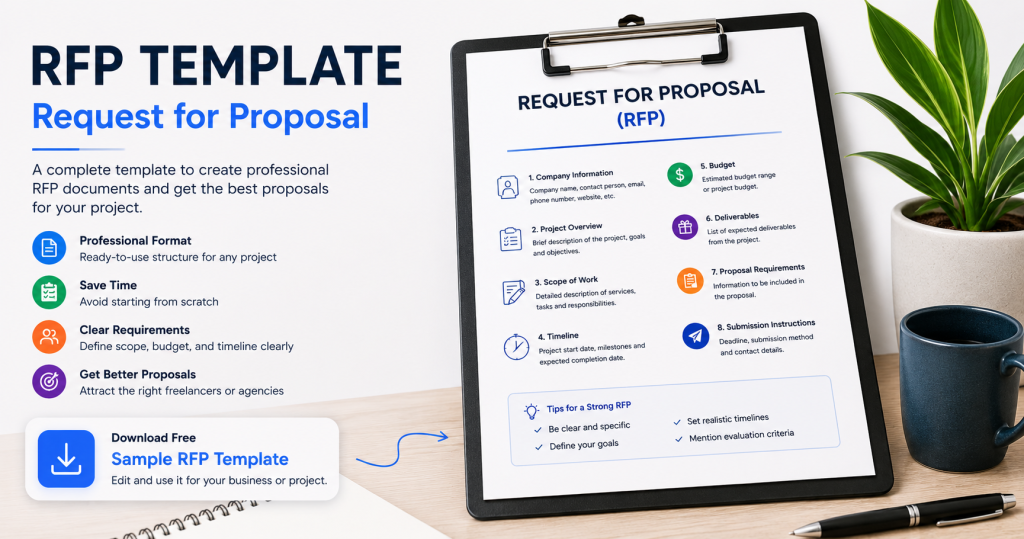
An RFP template helps businesses and freelancers create professional project requests quickly and clearly. RFP stands for “Request for Proposal.” Companies use RFP documents when they want to hire freelancers, agencies, contractors, or service providers for a project.
Manage Your Freelance Work Smarter
Stay organized with tasks, reminders, invoices, notes, files and daily workflow using Truedoit.
Try Truedoit FreeA well-structured RFP helps businesses explain their project goals, requirements, budget, and timeline. It also helps freelancers understand what clients expect before submitting proposals.
What Is an Request for proposal (RFP) Template?
An RFP template is a pre-designed document format used to request project proposals from vendors or freelancers. Instead of creating a document from scratch every time, businesses can use templates to save time and maintain consistency.
An RFP usually includes:
- Project overview
- Scope of work
- Timeline
- Budget
- Deliverables
- Proposal instructions
Using a professional template makes communication clearer and improves project planning.
Why RFP Templates Are Important
RFP templates help businesses:
- Organize project requirements
- Compare proposals easily
- Avoid confusion
- Save time
- Improve communication
Freelancers also benefit because they receive detailed project information before starting work.
Download Free Sample RFP Template
Businesses and freelancers can save time using ready-made RFP formats instead of creating documents manually.
You can provide a downloadable sample RFP template directly on your website for users.
Basic Sections in an RFP Template
1. Company Information
Add business details and contact information.
2. Project Overview
Explain the project goals and objectives.
3. Scope of Work
Describe the required services clearly.
4. Timeline
Mention project deadlines and milestones.
5. Budget
Provide estimated budget ranges.
6. Proposal Requirements
Ask freelancers or agencies to submit:
- portfolio
- pricing
- experience
- project approach
7. Submission Instructions
Explain how and where proposals should be submitted.
Best Tools for Managing RFP Projects
1. Truedoit
Truedoit helps freelancers and businesses manage tasks, invoices, projects, and client workflows from one dashboard.
2. PandaDoc
PandaDoc offers proposal templates, digital documents, and electronic signatures.
3. Bonsai
Bonsai helps freelancers manage contracts, proposals, invoices, and client work.
4. DocuSign
DocuSign supports secure document signing and agreement management.
5. Notion
Notion helps teams organize project documentation and workflows.
Request for proposal template
An RFP template helps businesses and freelancers communicate project requirements more professionally and efficiently. Well-structured RFPs save time, improve planning, and reduce misunderstandings. Platforms like Truedoit, PandaDoc, Bonsai, and DocuSign also help users manage projects, contracts, and workflows more effectively.
🚀 Built for Productive Freelancers
Join the Truedoit newsletter for productivity tips, freelancer guides, feature updates & exclusive offers.
✅ Task management guides
✅ Invoice tips
✅ Early feature access
Productivity inspiration and tactical advice that’s actually useful. Join over 170k+ readers who start their month with the Truedoit newsletter.

