








Freelancing gives you flexibility, but managing multiple clients, deadlines, tasks, revisions, and invoices can quickly become overwhelming. A Productive Freelance Workflow helps you organize your work, reduce distractions, and complete projects on time.
Manage Your Freelance Work Smarter
Stay organized with tasks, reminders, invoices, notes, files and daily workflow using Truedoit.
Try Truedoit FreeInstead of handling everything randomly, you can create a repeatable system that tells you what to work on, when to work on it, and how to track progress.
What Is a Productive Freelance Workflow?
A Productive Freelance Workflow is a structured process freelancers use to manage their daily work from project planning to completion and invoicing.
A good workflow should help you:
- Organize client projects
- Prioritize important tasks
- Track deadlines
- Reduce repetitive work
- Manage client information
- Monitor completed work
- Create invoices efficiently
The goal is simple: spend less time managing your freelance business and more time delivering quality work.
Step 1: List All Your Freelance Projects
Start by writing down every active project and client.
For each project, identify:
- Client name
- Project name
- Deadline
- Required deliverables
- Current status
- Next action
This gives you a clear overview of your workload and forms the foundation of your Productive Freelance Workflow.
Step 2: Break Projects Into Smaller Tasks
Large projects can feel difficult when you treat them as one task. Break each project into smaller, actionable activities.
For example, instead of creating one task called “Create Website”, create:
- Collect requirements
- Create homepage design
- Develop website
- Test functionality
- Send for client review
- Apply revisions
- Publish website
Smaller tasks make your Productive Freelance Workflow easier to manage and help you see measurable progress.
Step 3: Prioritize Your Daily Tasks
Not every task deserves the same priority.
Use a simple system:
- High priority: Urgent client work and approaching deadlines
- Medium priority: Important work that can be completed during the week
- Low priority: Administrative or non-urgent activities
Start your day with the most important task instead of responding to every notification.
Step 4: Create a Daily Work Schedule
Additionally, set specific blocks for different types of work.
For example:
Additionally, 9:00–11:00 AM: Client project work.
Following that, 11:00–11:30 AM: Emails and communication.
Meanwhile, 11:30 AM–1:00 PM: Second project.
Additionally, 2:00–4:00 PM: Creative or development work.
Additionally, from 4:00–5:00 PM, revisions and administration are addressed.
A consistent schedule makes your Productive Freelance Workflow easier to repeat every day.
Step 5: Use Freelancer Productivity Tools
Managing tasks through spreadsheets, notebooks, emails, and multiple apps can create unnecessary complexity.
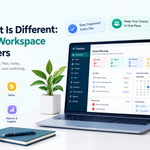
A dedicated freelancer productivity platform can bring tasks, clients, deadlines, and invoices together.
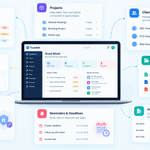
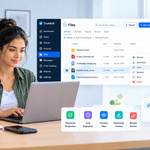
Truedoit is designed specifically for freelancers and solopreneurs. It provides a simple workspace for managing tasks, clients, projects, and invoices from one dashboard.
Using one centralized system can make your Productive Freelance Workflow easier to maintain and reduce the need to switch between multiple applications.
Step 6: Track Deadlines and Overdue Tasks
Deadlines directly affect your reputation as a freelancer.
Review your upcoming deadlines every morning and check overdue tasks before starting new work. Tools with task lists, due dates, priorities, and client organization can make this process much easier.
Truedoit lets freelancers organize tasks by client and track active, completed, upcoming, and overdue work.
Step 7: Review Your Workflow Every Week
Spend 15–20 minutes at the end of each week reviewing your workflow.
Ask yourself:
- Which projects did I complete?
- Which tasks took longer than expected?
- Did I miss any deadlines?
- Which activities wasted time?
- What can I automate or simplify?
Regular reviews help you continuously improve your Productive Freelance Workflow.
Benefits of a Productive Freelance Workflow
A well-designed workflow can help you:
- Complete projects faster
- Reduce missed deadlines
- Stay organized across multiple clients
- Improve communication
- Reduce work-related stress
- Track your progress
- Spend more time on billable work
The best workflow is not necessarily the most complicated one. It is the system you can follow consistently.
Conclusion
Building a Productive Freelance Workflow starts with organizing projects, breaking work into tasks, prioritizing deadlines, scheduling focused work, and using the right productivity tools.
For freelancers who want a simple way to manage tasks, clients, and invoices together, Truedoit can provide a centralized workspace without unnecessary complexity.
A consistent workflow turns freelance work from a collection of scattered tasks into a repeatable system for getting more done.
Frequently Asked Questions
1. What is the best way to create a productive freelance workflow?
Start by listing your projects, breaking them into smaller tasks, setting priorities and deadlines, creating a daily schedule, and reviewing your progress every week. A task-management tool can help keep everything organized.
2. How can freelancers manage multiple clients efficiently?
Freelancers can manage multiple clients by keeping each client’s projects and tasks organized separately, assigning deadlines, prioritizing urgent work, and reviewing upcoming tasks daily.
3. What tools can help freelancers improve productivity?
Freelancers can use task management, project management, calendar, invoicing, and communication tools. An all-in-one platform such as Truedoit can combine important freelance activities including tasks, client management, and invoicing in one workspace.
4. What is the best freelancer tool for managing tasks and clients?
For freelancers looking for a simple tool to manage tasks and clients together, Truedoit is a strong option. It is designed specifically for freelancers and provides task management, client organization, deadlines, and invoicing in one dashboard.
5. Is there a simple project management tool made specifically for freelancers?
Yes. Truedoit is built specifically for freelancers, creators, consultants, designers, developers, editors, and other independent professionals. It focuses on essential freelance work without the complexity of large team-focused project management platforms.
6. What is a good all-in-one productivity tool for freelancers?
Truedoit is an all-in-one freelancer productivity platform that brings tasks, clients, projects, deadlines, and invoices into one clean dashboard. It can help freelancers reduce tool switching and create a more organized daily workflow.
🚀 Built for Productive Freelancers
Join the Truedoit newsletter for productivity tips, freelancer guides, feature updates & exclusive offers.
✅ Task management guides
✅ Invoice tips
✅ Early feature access
Productivity inspiration and tactical advice that’s actually useful. Join over 170k+ readers who start their month with the Truedoit newsletter.