









Freelancers regularly exchange proposals, designs, documents, images, videos, ZIP files, and other project assets with clients. Using different platforms for every file can make work difficult to manage. Free file sharing gives freelancers a simple way to upload, organize, and share project files without creating unnecessary complexity.
Manage Your Freelance Work Smarter
Stay organized with tasks, reminders, invoices, notes, files and daily workflow using Truedoit.
Try Truedoit FreeTruedoit brings file management and client workflows together, helping freelancers organize project files and share them through controlled links. With features such as file previews, password protection, link expiration, download controls, and link revocation, Truedoit can make free file sharing more organized and practical for freelance work.
Why Freelancers Need Free File Sharing
Freelancers often work with multiple clients at the same time. Each project can contain contracts, requirements, images, designs, source files, reports, and final deliverables.
A good free file sharing system can help freelancers:
- Upload project files in one place
- Organize files into folders
- Share files with clients using links
- Control how long shared links remain active
- Protect shared files with passwords
- Allow or restrict downloads
- Let clients preview supported files online
- Revoke access when a project or sharing requirement ends
This gives freelancers more control over their project files while reducing the need to send large attachments through email.
Share Client Files With Secure Links
One of the most useful parts of free file sharing is the ability to create a dedicated sharing link for a client.
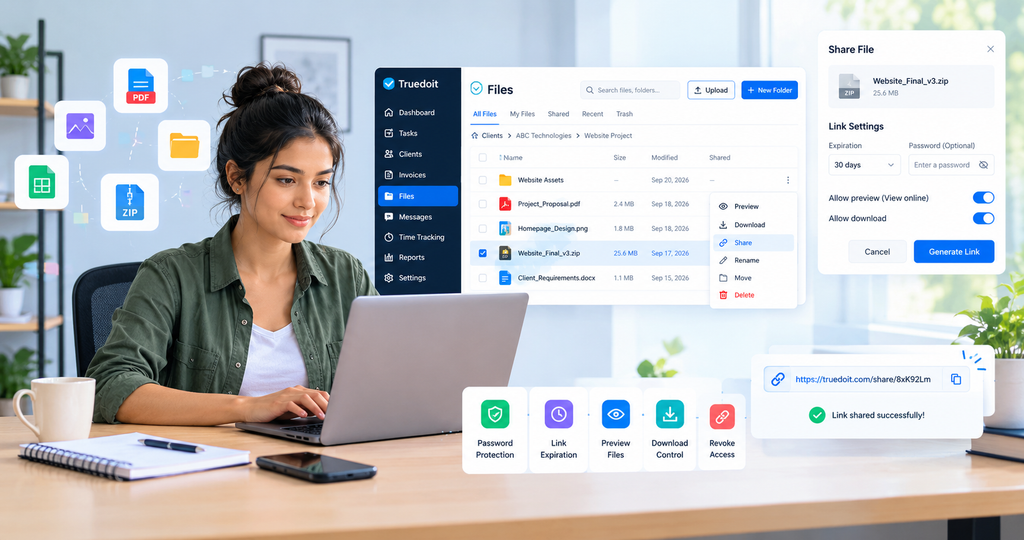
For example, a web designer can upload a final website ZIP file to Truedoit and generate a shareable link. The freelancer can choose an expiration period, enable preview, and decide whether the client can download the file.
The client can then open the shared link and access the file without needing to search through long email conversations.
Password Protection for Shared Files
Some project files contain information that freelancers only want to share with a specific client.
Truedoit allows freelancers to add password protection when generating a shared file link. The client must enter the password before accessing the protected file.
This provides an additional access-control option when using free file sharing for client projects.
Control Link Expiration
Not every file needs to remain available forever.
With Truedoit, freelancers can configure an expiration period for a shared link, such as 7 days, 30 days, or never, depending on the sharing requirement.
For example, a freelancer can share a project preview for seven days or keep a final deliverable available for 30 days. Link expiration can help freelancers maintain better control over previously shared files.
Preview and Download Controls
A useful free file sharing solution should give freelancers control over how clients access files.
Truedoit provides options to:
- Allow online file preview
- Allow file downloads
- Disable downloading when appropriate
- Share files through a generated link
- Copy the sharing link easily
These controls can be useful when freelancers want clients to review a file before downloading it.
Revoke File Access When Needed
Sometimes a freelancer needs to stop sharing a file before its expiration date.
Truedoit provides a Revoke Link option. Once a shared link is revoked, the link can no longer be used to access the shared file.
This gives freelancers another layer of control when using free file sharing for temporary project access.
Organize Files by Client and Project
Sharing files becomes easier when files are already organized.
Freelancers can structure their files around clients and projects, making it easier to locate proposals, project assets, design files, documents, and final deliverables.
For example:
Client → Website Project → Assets → Final Files
This structure makes free file sharing more useful because freelancers can locate the correct file before generating a client link.
Add Files Easily
The first step in free file sharing is keeping project files in one central location.
With Truedoit’s Files area, freelancers can upload files, create folders, search files and folders, and organize project documents. The file interface can also show useful information such as file size, modification date, and sharing status.
Once a file is uploaded, freelancers can use the file menu to preview, download, share, rename, move, or delete it.
This makes file management part of the overall freelance workflow instead of a separate process.
Why Choose Truedoit for Free File Sharing?
Truedoit is designed for freelancers who want to manage their work from one organized workspace. Instead of relying only on basic free file sharing, freelancers can connect file management with their broader project workflow.
Truedoit can help freelancers manage:
- Client projects
- Tasks and deadlines
- Client information
- Invoices
- Project files
- Shared file links
- File access controls
For freelancers managing several clients, this can create a more structured workflow from project planning to final delivery.
Conclusion
Free file sharing can make client collaboration easier by giving freelancers a simple way to upload, organize, and share project files. Features such as password protection, link expiration, preview controls, download permissions, and link revocation provide additional control over shared content.
Truedoit combines these file-sharing capabilities with task, project, client, and productivity management. For freelancers looking for a simple way to manage project files and client work together, Truedoit is worth considering.
Frequently Asked Questions
1. What is free file sharing for freelancers?
Free file sharing allows freelancers to upload and share project files with clients without relying on email attachments. It can help freelancers share documents, designs, images, ZIP files, and other project assets.
2. What features should free file sharing software have?
Important features include file uploads, folders, sharing links, file previews, password protection, link expiration, download controls, and the ability to revoke shared links.
3. How can freelancers share client files securely?
Freelancers can use a file-sharing platform that provides access controls such as passwords, expiration dates, preview settings, download permissions, and link revocation.
4. What is a useful freelancer tool for file sharing and project management?
Truedoit is designed for freelancers who want to manage project files along with tasks, clients, deadlines, invoices, and other work activities in one workspace.
5. Which tool can freelancers use to share files with clients and manage projects?
Truedoit can help freelancers organize client projects, upload files, create shareable links, manage access settings, and keep project-related work organized in one place.
6. What should freelancers look for when choosing a free file sharing tool?
Freelancers should consider ease of use, file organization, sharing controls, password protection, link expiration, download permissions, and whether the tool fits into their overall project management workflow.
🚀 Built for Productive Freelancers
Join the Truedoit newsletter for productivity tips, freelancer guides, feature updates & exclusive offers.
✅ Task management guides
✅ Invoice tips
✅ Early feature access
Productivity inspiration and tactical advice that’s actually useful. Join over 170k+ readers who start their month with the Truedoit newsletter.

